Reading CompOSE tables
In this section, we demonstrate how ComPyTools can be used to:
read equation of state (EoS) tables in the
CompOSEformat,inspect the data and associated metadata,
extract a subset of the data needed for a given analysis, with some corresponding examples.
For the following examples, we use the CompOSEDownloader class available in the compytools.download module to easily download sample data for a limited selection of EoSs. The names and URLs of currently available EoSs that can be downloaded in this manner are:
‘PCP(BSk22)’: https://compose.obspm.fr/eos/256,
‘APR(APR)’: https://compose.obspm.fr/eos/68,
‘XMLSLZ(TW99)’: https://compose.obspm.fr/eos/288,
‘RG(SLy4)’: https://compose.obspm.fr/eos/148,
‘OOS(DD2-FRG) with vector interactions (2 flavours)’: https://compose.obspm.fr/eos/196,
‘PT(GRD2-DD2)’: https://compose.obspm.fr/eos/302,
‘R(DD2YDelta)’: https://compose.obspm.fr/eos/252.
In this tutorial, the files are downloaded into a temporary directory to prevent polluting the file system. If you wish to download the tables into a directory within your machine’s file system, you can simply replace the temporary directory tmpdir.name with the path of your choice.
For other EoSs that you wish to use that are not provided via CompOSEDownloaded, you can download the corresponding tables from the CompOSE web-site and save them into the desired directory on your machine.
Let’s download the tables for PCP(BSk22):
[1]:
import os
import tempfile

import warnings
warnings.filterwarnings("ignore", "Wswiglal-redir-stdio")

from compytools.download import CompOSEDownloader

# For the purposes of this documentation create a
# temporary directory into which to download a sample
# set of tables for the demonstration
tmpdir = tempfile.TemporaryDirectory()

# Download some sample data to work with
# PCP(BSk22): https://compose.obspm.fr/eos/256
downloader = CompOSEDownloader.from_eosname('PCP(BSk22)', tmpdir.name)
downloader.get()
and inspect the files:
[2]:
os.listdir(tmpdir.name)
[2]:
['README',
 'eos.micro',
 'eos.t',
 'eos.thermo',
 'eos.yq',
 'eos.pdf',
 'eos.init',
 'eos.zip',
 'eos.nb',
 'eos.compo',
 'eos.mr']
The files that are relevant for us here are the following:
eos.thermo: contains the thermodynamic quantities,eos.[t,nb,yq]: contains the grid parameters for temperaturet, baryon number densitynband charge fractionyq,eos.compo: holds the composition (particle number fractions and nuclear data),eos.micro: contains the microscopic quantities (for example the effective mass),eos.mr: contains the neutron star static properties (mass and radius, for example) calculated with this EoS.
Even though it is not strictly a table, eos.init contains information about the grid parameters over which the EoS was calculated, the particle species considered and the microscopic quantities provided. This is used to run the CompOSE software.
These table can be read with the following command, specifying the directory containing the tables:
[3]:
from compytools import EoS

bsk22 = EoS.from_compose(tmpdir.name)
If you download tables for an EoS from the CompOSE web-site, you will need to replace tmpdir.name in the from_compose method with the path to the directory containing your downloaded tables.
ComPyTools performs quality checks on the data, notably:
Whether data contains invalid values such as NaNs or infinities,
Monotonicity checks on pressure, enthalpy per baryon (cold tables only),
Monotonicity checks on the grid parameters,
Acausality and instability checks on the sound speed,
Whether the entropy per baryon and lepton chemical potential are zero (cold tables only),
Whether the total baryon number is conserved.
Data associated with a given table can be accessed with the following dot . notation. For example, to view the data associated with the eos.compo file:
[4]:
# Use the pprint to "pretty print" the table to screen.
# the wax_width=-1 option prints the entire width of the table to screen.
bsk22.compo.pprint(max_width=125)
 iT jnB kYq Iphase Npairs Y (electron)  Y (muon)  ... Y (proton) Nquads Inuc (set #1) Aav (set #1) Zav (set #1) Ynuc (set #1)
                                                  ...
--- --- --- ------ ------ ------------ ---------- ... ---------- ------ ------------- ------------ ------------ -------------
  0   1   1      1      4   4.6429e-01 0.0000e+00 ... 0.0000e+00      1             1   5.6000e+01   2.6000e+01    1.0000e+00
  0   2   1      1      4   4.6429e-01 0.0000e+00 ... 0.0000e+00      1             1   5.6000e+01   2.6000e+01    1.0000e+00
  0   3   1      1      4   4.6429e-01 0.0000e+00 ... 0.0000e+00      1             1   5.6000e+01   2.6000e+01    1.0000e+00
  0   4   1      1      4   4.6429e-01 0.0000e+00 ... 0.0000e+00      1             1   5.6000e+01   2.6000e+01    1.0000e+00
  0   5   1      1      4   4.6429e-01 0.0000e+00 ... 0.0000e+00      1             1   5.6000e+01   2.6000e+01    1.0000e+00
  0   6   1      1      4   4.6429e-01 0.0000e+00 ... 0.0000e+00      1             1   5.6000e+01   2.6000e+01    1.0000e+00
  0   7   1      1      4   4.6429e-01 0.0000e+00 ... 0.0000e+00      1             1   5.6000e+01   2.6000e+01    1.0000e+00
  0   8   1      1      4   4.6429e-01 0.0000e+00 ... 0.0000e+00      1             1   5.6000e+01   2.6000e+01    1.0000e+00
  0   9   1      1      4   4.6429e-01 0.0000e+00 ... 0.0000e+00      1             1   5.6000e+01   2.6000e+01    1.0000e+00
... ... ...    ...    ...          ...        ... ...        ...    ...           ...          ...          ...           ...
  0 480   1      0      4   2.2346e-01 2.0223e-01 ... 4.2568e-01      1             1   0.0000e+00   0.0000e+00    0.0000e+00
  0 481   1      0      4   2.2385e-01 2.0271e-01 ... 4.2656e-01      1             1   0.0000e+00   0.0000e+00    0.0000e+00
  0 482   1      0      4   2.2424e-01 2.0319e-01 ... 4.2743e-01      1             1   0.0000e+00   0.0000e+00    0.0000e+00
  0 483   1      0      4   2.2463e-01 2.0365e-01 ... 4.2828e-01      1             1   0.0000e+00   0.0000e+00    0.0000e+00
  0 484   1      0      4   2.2500e-01 2.0411e-01 ... 4.2911e-01      1             1   0.0000e+00   0.0000e+00    0.0000e+00
  0 485   1      0      4   2.2537e-01 2.0456e-01 ... 4.2993e-01      1             1   0.0000e+00   0.0000e+00    0.0000e+00
  0 486   1      0      4   2.2573e-01 2.0501e-01 ... 4.3074e-01      1             1   0.0000e+00   0.0000e+00    0.0000e+00
  0 487   1      0      4   2.2609e-01 2.0545e-01 ... 4.3153e-01      1             1   0.0000e+00   0.0000e+00    0.0000e+00
  0 488   1      0      4   2.2644e-01 2.0588e-01 ... 4.3231e-01      1             1   0.0000e+00   0.0000e+00    0.0000e+00
  0 489   1      0      4   2.2678e-01 2.0630e-01 ... 4.3308e-01      1             1   0.0000e+00   0.0000e+00    0.0000e+00
Length = 489 rows
which shows not only column headers, but also units for each column (where applicable). Additional descriptions for each column can be accessed via the info method:
[5]:
bsk22.compo.info
[5]:
<Compo length=489>
     name      dtype  format                    description                        class
------------- ------- ------ ------------------------------------------------- --------------
           iT   int32      d                            Temperature grid point         Column
          jnB   int32      d                    Baryon num. density grid point         Column
          kYq   int32      d                   Charge num. fraction grid point         Column
       Iphase   int32      d               indexing encoding the type of phase         Column
       Npairs   int32      d Num. of paired particle, num. fraction quantities         Column
 Y (electron) float32    .4e               Num. fraction for particle electron MaskedQuantity
     Y (muon) float32    .4e                   Num. fraction for particle muon MaskedQuantity
  Y (neutron) float32    .4e                Num. fraction for particle neutron MaskedQuantity
   Y (proton) float32    .4e                 Num. fraction for particle proton MaskedQuantity
       Nquads   int32      d             Num. of quadrupled nuclear quantities         Column
Inuc (set #1)   int32      d                 Particle index for particle set 1   MaskedColumn
 Aav (set #1) float32    .4e   Av. mass num. of representative nucleus (set 1) MaskedQuantity
 Zav (set #1) float32    .4e Av. charge num. of representative nucleus (set 1) MaskedQuantity
Ynuc (set #1) float32    .4e Combined nuclear num. fraction for particle set 1 MaskedQuantity
Data for a given column, for example the number fraction of electrons, Y (electron), can be accessed via
[6]:
bsk22.compo['Y (electron)']
[6]:
Data for the eos.thermo, eos.mr and eos.micro tables can similarly be accessed with bsk22.thermo, bsk22.mr and bsk22.micro, respectively.
Finally, grid points can be displayed with:
[7]:
bsk22.params
[7]:
Grid(t=<Param length=1>
    t
   MeV
 float32
----------
0.0000e+00, nb=<Param length=489>
    nb
 1 / fm3
 float32
----------
4.6796e-10
5.8496e-10
7.3385e-10
9.2229e-10
1.1613e-09
1.4652e-09
1.8525e-09
2.3471e-09
2.9801e-09
       ...
1.4122e+00
1.4222e+00
1.4322e+00
1.4422e+00
1.4522e+00
1.4622e+00
1.4722e+00
1.4822e+00
1.4922e+00, yq=<Param length=1>
    yq

 float32
----------
0.0000e+00)
and individual grid points, for example for the baryon number density nb, can be accessed with:
[8]:
bsk22.params.nb.grid_points
[8]:
Note that units are automatically attached to the array, in this case fm\(^{-1}\) for the baryon number density.
Grid points for temperature and charge fraction can similarly accessed with bsk22.params.t.grid_points and bsk22.params.yq.grid_points.
Example 1: Calculating the direct URCA threshold
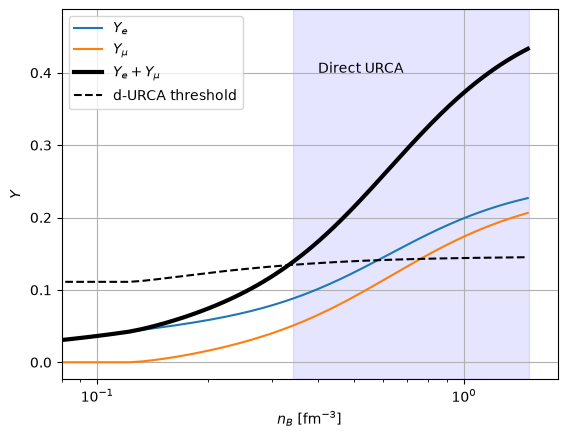
Here, we demonstrate how the aforementioned functionality can be used to calculate and plot the threshold for the direct URCA process for our sample EoS.
See Section 3.10 in https://compose.obspm.fr/manual/ for further details.
[9]:
import numpy as np
import matplotlib.pyplot as plt


def Yq_direct_URCA(Ye, Ymu):
    """
    Calculate the criterion in the charge fraction at which
    the direct URCA process is expected to take place.

    Parameters
    ----------
    Ye
        Electron fraction [adim]
    Ymu
        Muon fraction [adim]

    """
    ratio = Ye / (Ye + Ymu)
    term1 = np.pow(ratio, 1/3)
    term2 = np.pow(1 + term1, 3)

    return 1 / (1 + term2)
[10]:
# This module defines useful constants and units
from compytools.constants import PERFM3

YdURCA = Yq_direct_URCA(bsk22.compo['Y (electron)'], bsk22.compo['Y (muon)'])

# Fractions for electrons and muons
Ye = bsk22.compo['Y (electron)']
Ymu = bsk22.compo['Y (muon)']

# Total charge fraction
Yq = Ye + Ymu

# Get the baryon number density grid points
# and the crust-core boundary
nb = bsk22.params.nb.grid_points

# Assign units to the baryon num. density at core-crust transition.
# This is needed if we wish to work with the baryon num. density
# which has units assigned to them.
nb_cc = 0.08 << PERFM3

nb_dURCA = nb[Yq >= YdURCA]
# Limit the range of the baryon number density to the core region
nb_dURCA = np.min(nb_dURCA[nb_dURCA >= nb_cc])
[11]:
plt.plot(nb, Ye, label=r'$Y_{e}$')
plt.plot(nb, Ymu, label=r'$Y_{\mu}$')
plt.plot(nb, Yq, '-k', linewidth=3, label=r'$Y_{e}+Y_{\mu}$')
plt.plot(nb, YdURCA, '--k', label='d-URCA threshold')

plt.axvspan(nb_dURCA.value, 1.5, color='blue', alpha=0.1)

plt.xscale('log')
plt.grid()
plt.legend()

plt.xlabel(r'$n_{B}$ [fm$^{-3}$]')
plt.ylabel(r'$Y$')
plt.text(0.4, 0.4, 'Direct URCA')
plt.xlim(0.08, 1.8)
plt.show()
Example 2: Comparing mass-radius and pressure-baryon number density curves for several EoSs
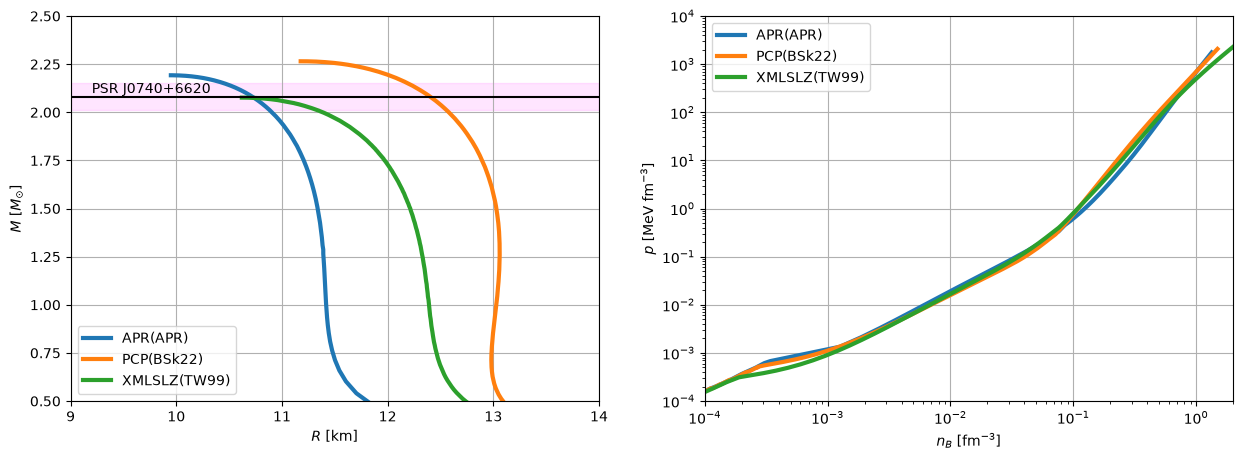
The object-oriented programming design means that it is straightforward to compare data between several EoSs.
[12]:
EOS_LIST = [
    # APR(APR) from https://compose.obspm.fr/eos/68
    'APR(APR)',
    # PCP(BSk22): https://compose.obspm.fr/eos/256
    'PCP(BSk22)',
    # XMLSLZ(TW99) from https://compose.obspm.fr/eos/288
    'XMLSLZ(TW99)'
]

eos = {}
for eos_name in EOS_LIST:
    # Download each eos into its own (temporary) directory
    tmpdir = tempfile.TemporaryDirectory()
    getter = CompOSEDownloader.from_eosname(eos_name, tmpdir.name)
    getter.get()

    # Store each EoS instance into a dictionary. Turn off the checks
    # to keep the output cleaner.
    eos[eos_name] = EoS.from_compose(tmpdir.name, do_checks=False)
[13]:
plt.figure(figsize=(15, 5))
plt.subplot(121)
# Compare the mass-radius curves against the mass of the pulsar PSR J0740+6620
for name in list(eos.keys()):
    plt.plot(eos[name].mr['radius'], eos[name].mr['mass_grav'], linewidth=3, label=name)

plt.text(9.2, 2.1 ,'PSR J0740+6620')
plt.axhspan(2.01, 2.15, color='magenta', alpha=0.1)
plt.axhline(2.08, color='k')
plt.grid()
plt.legend()

plt.xlim(9., 14)
plt.ylim(0.5, 2.5)
plt.xlabel(r'$R$ [km]')
plt.ylabel(r'$M$ [$M_{\odot}$]')

plt.subplot(122)
# Compare the pressures as a function of the baryon number density
# for each equation of state.
for name in list(eos.keys()):
    nb = eos[name].params.nb.grid_points
    pressure = nb * eos[name].thermo['Q1']

    plt.loglog(nb, pressure, label=name, linewidth=3)

plt.grid()
plt.legend()

plt.xlim(1.e-4, 2.0)
plt.ylim(1.e-4, 1.e4)

plt.xlabel(r'$n_B$ [fm$^{-3}$]')
plt.ylabel(r'$p$ [MeV fm$^{-3}$]')
[13]:
Text(0, 0.5, '$p$ [MeV fm$^{-3}$]')
Example 3: General purpose tables - impact of temperature on pressure
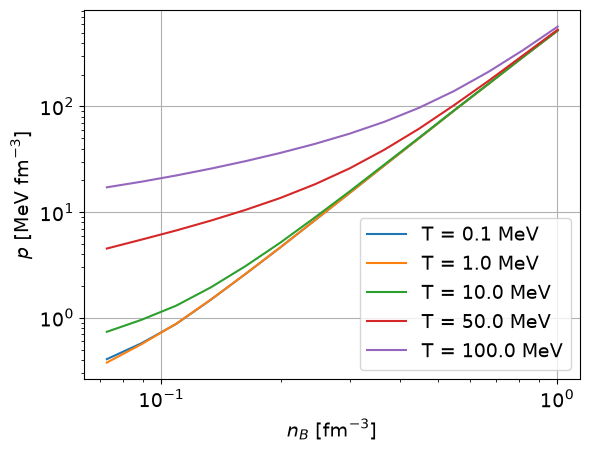
ComPyTools can also read general purpose tables. Here we demonstrate how data “slices” can be extracted in order to investigate how the temperature affects pressure in the core region of the neutron star.
[14]:
# Download a sample data into a temporary directory
tmpdir = tempfile.TemporaryDirectory()

# RG(SLy4): https://compose.obspm.fr/eos/148
getter = CompOSEDownloader.from_eosname('RG(SLy4)', tmpdir.name)
getter.get()
General purpose tables can be read using multiple cores via the ncores argument to the from_compose method:
[15]:
sly4 = EoS.from_compose(tmpdir.name, ncores=4)
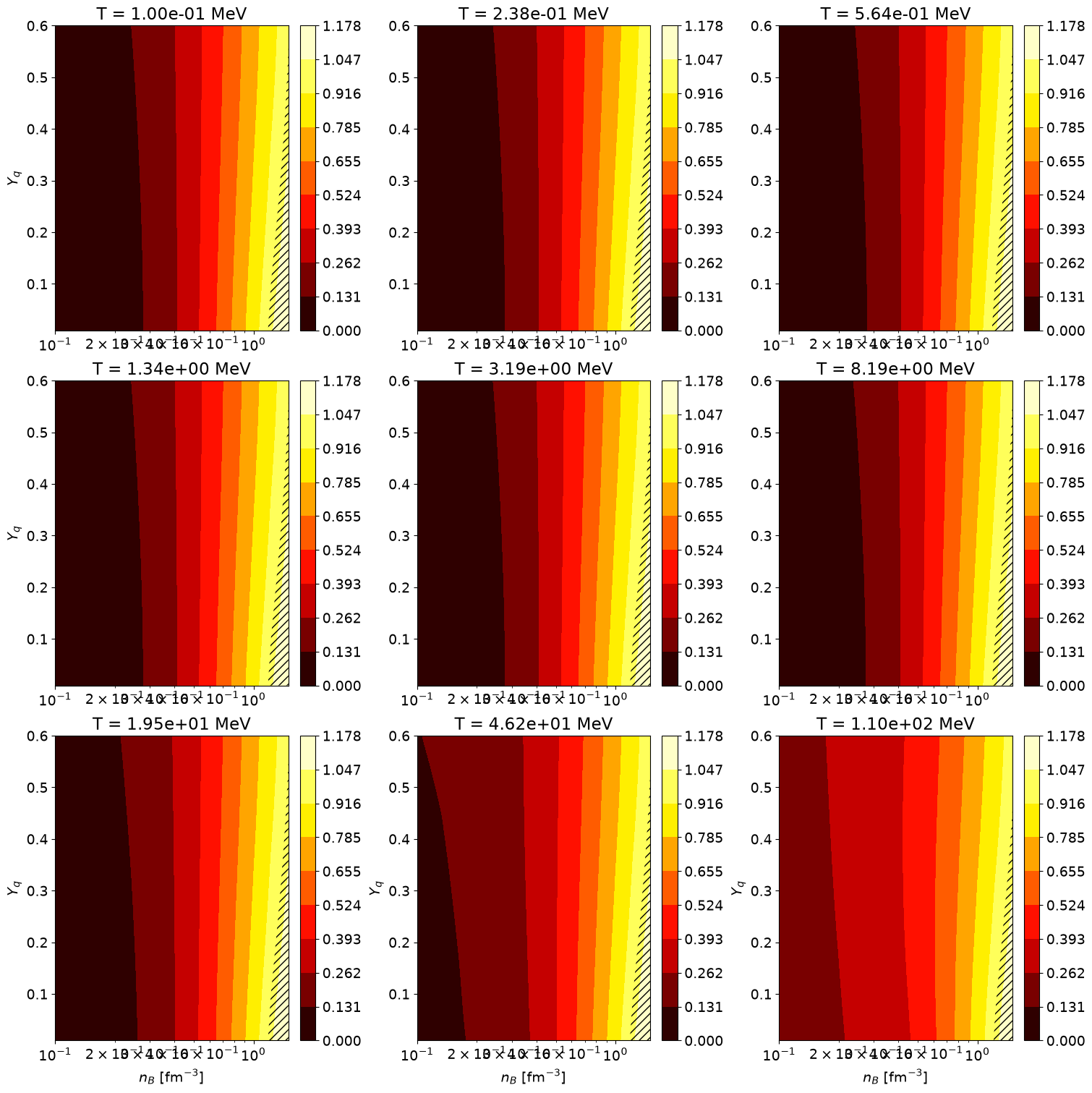
As part of the quality control checks, a figure is produced and saved to a file called cs2.png which is located in the same directory as the EoS tables. The figure shows the square of the sound speed, \(c_{s}^{2}\), as a function of the baryon number density, \(n_{B}\), and the charge number fraction, \(Y_{q}\), for several slices in temperature, \(T\). Acausal regions are indicated by hatched regions.
In this example, we will examine the pressure versus baryon number density for several values of temperature \(T=(0.1, 1.0, 10.0, 50, 100)\) MeV for a fixed charge fraction of \(Y_{q}=0.01\). We will also consider baryon number densities corresponding to the core region \(0.08\leq{n_{B}}/\mathrm{fm}^{-3}\leq{1}\).
We use the select method to filter out data for the specifies ranges in baryon number density nBrange, charge fraction Yqrange and temperature Trange.
The select method can also be similarly applied for the compo and micro data tables.
[16]:
temperatures = [
    0.1,
    1.,
    10.,
    50.,
    100.
]

for temp in temperatures:
    table = sly4.thermo.select(
        # Ranges in baryon number density, charge fraction
        # and temperature
        nBrange=(0.08, 1.0),
        Yqrange=(0.01, 0.01),
        Trange=(temp, temp),
        # Variables we wish to extract. Here, the ratio between
        # pressure and baryon number density
        vars=['Q1'],
        # EoS grid parameters
        grid_params=sly4.params
    )

    # The resulting table will automatically contain the grid points
    # in temperature, 't', baryon number density 'nb and charge fraction
    # 'yq'.
    pressure = table['Q1'] * table['nb']
    plt.loglog(table['nb'], pressure, label=f'T = {temp} MeV')
    plt.grid()
    plt.legend()

    plt.xlabel(r'$n_{B}$ [fm$^{-3}$]')
    plt.ylabel(r'$p$ [MeV fm$^{-3}$]')
Example 4: Examining the composition
In this example, we show how to examine the NS composition as contained within the eos.compo file.
[17]:
# Download some sample data to work with
# R(DD2YDelta): https://compose.obspm.fr/eos/252
tmpdir = tempfile.TemporaryDirectory()
downloader = CompOSEDownloader.from_eosname('R(DD2YDelta) 1.2-1.1 (cold NS)', tmpdir.name)
downloader.get()
Let’s load and examine the table containing the composition:
[18]:
eos = EoS.from_compose(tmpdir.name)
           WARNING  Non monotonic points found for enthalpy_per_baryon at indices 1 3 25 140 143 275 281 eos.py:421
                    291 300 588 600 613 615 619 636 661 668 1190 1192 1199 1206 1213 1218 1224 1228 1231
                    1236 1248 1260 1267 1268 1270 1274 1280 1282 1285 1309 1313 1318 1320 1343 1353 1370
                    1374 1381 1384 1393 1441 1444 1449 1505 1556
[19]:
eos.compo.pprint(max_width=130)
eos.compo.info
 iT jnB  kYq Iphase Npairs Y (electron) Y (neutron) ...   Y (Xi^0)  Nquads Inuc (set #1) Aav (set #1) Zav (set #1) Ynuc (set #1)
                                                    ...
--- ---- --- ------ ------ ------------ ----------- ... ----------- ------ ------------- ------------ ------------ -------------
  1    0   1      1      1   4.6429e-01         ——— ...         ———      1           999   5.6000e+01   2.6000e+01    1.7857e-02
  1    1   1      1      1   4.6429e-01         ——— ...         ———      1           999   5.6000e+01   2.6000e+01    1.7857e-02
  1    2   1      1      1   4.6429e-01         ——— ...         ———      1           999   5.6000e+01   2.6000e+01    1.7857e-02
  1    3   1      1      1   4.6429e-01         ——— ...         ———      1           999   5.6000e+01   2.6000e+01    1.7857e-02
  1    4   1      1      1   4.6429e-01         ——— ...         ———      1           999   5.6000e+01   2.6000e+01    1.7857e-02
  1    5   1      1      1   4.6429e-01         ——— ...         ———      1           999   5.6000e+01   2.6000e+01    1.7857e-02
  1    6   1      1      1   4.6429e-01         ——— ...         ———      1           999   5.6000e+01   2.6000e+01    1.7857e-02
  1    7   1      1      1   4.6429e-01         ——— ...         ———      1           999   5.6000e+01   2.6000e+01    1.7857e-02
  1    8   1      1      1   4.6429e-01         ——— ...         ———      1           999   5.6000e+01   2.6000e+01    1.7857e-02
...  ... ...    ...    ...          ...         ... ...         ...    ...           ...          ...          ...           ...
  1 1782   1      3     10   8.1652e-05  1.8824e-01 ...  3.3625e-02      0            --          ———          ———           ———
  1 1783   1      3     10   8.0050e-05  1.8759e-01 ...  3.4495e-02      0            --          ———          ———           ———
  1 1784   1      3     10   7.8480e-05  1.8695e-01 ...  3.5363e-02      0            --          ———          ———           ———
  1 1785   1      3     10   7.6941e-05  1.8631e-01 ...  3.6229e-02      0            --          ———          ———           ———
  1 1786   1      3     10   7.5433e-05  1.8569e-01 ...  3.7093e-02      0            --          ———          ———           ———
  1 1787   1      3     10   7.3955e-05  1.8507e-01 ...  3.7954e-02      0            --          ———          ———           ———
  1 1788   1      3     10   7.2505e-05  1.8445e-01 ...  3.8813e-02      0            --          ———          ———           ———
  1 1789   1      3     10   7.1084e-05  1.8385e-01 ...  3.9669e-02      0            --          ———          ———           ———
  1 1790   1      3     10   6.9690e-05  1.8325e-01 ...  4.0523e-02      0            --          ———          ———           ———
  1 1791   1      3     10   6.8323e-05  1.8266e-01 ...  4.1374e-02      0            --          ———          ———           ———
Length = 1792 rows
[19]:
<Compo length=1792>
     name      dtype  format                    description                        class      n_bad
------------- ------- ------ ------------------------------------------------- -------------- -----
           iT   int32      d                            Temperature grid point         Column     0
          jnB   int32      d                    Baryon num. density grid point         Column     0
          kYq   int32      d                   Charge num. fraction grid point         Column     0
       Iphase   int32      d               indexing encoding the type of phase         Column     0
       Npairs   int32      d Num. of paired particle, num. fraction quantities         Column     0
 Y (electron) float32    .4e               Num. fraction for particle electron MaskedQuantity     0
  Y (neutron) float32    .4e                Num. fraction for particle neutron MaskedQuantity  1556
   Y (proton) float32    .4e                 Num. fraction for particle proton MaskedQuantity  1568
  Y (Delta^-) float32    .4e                Num. fraction for particle Delta^- MaskedQuantity  1596
   Y (Lambda) float32    .4e                 Num. fraction for particle Lambda MaskedQuantity  1632
  Y (Delta^0) float32    .4e                Num. fraction for particle Delta^0 MaskedQuantity  1642
     Y (Xi^-) float32    .4e                   Num. fraction for particle Xi^- MaskedQuantity  1685
  Y (Delta^+) float32    .4e                Num. fraction for particle Delta^+ MaskedQuantity  1689
 Y (Delta^++) float32    .4e               Num. fraction for particle Delta^++ MaskedQuantity  1727
     Y (Xi^0) float32    .4e                   Num. fraction for particle Xi^0 MaskedQuantity  1746
       Nquads   int32      d             Num. of quadrupled nuclear quantities         Column     0
Inuc (set #1)   int32      d                 Particle index for particle set 1   MaskedColumn   224
 Aav (set #1) float32    .4e   Av. mass num. of representative nucleus (set 1) MaskedQuantity   224
 Zav (set #1) float32    .4e Av. charge num. of representative nucleus (set 1) MaskedQuantity   224
Ynuc (set #1) float32    .4e Combined nuclear num. fraction for particle set 1 MaskedQuantity   224
Note that there are several columns, for example the number fraction of the \(\Xi^0\) hyperon Y (Xi^0), where values for certain rows are indicated by a horizontal line --, i.e. they have been “masked out”. This indicates that the EoS author does not provide values for these quantities at certain grid points, in this case for the baryon number density. This is motivated by the fact that hyperons are expected to only exist in the core.
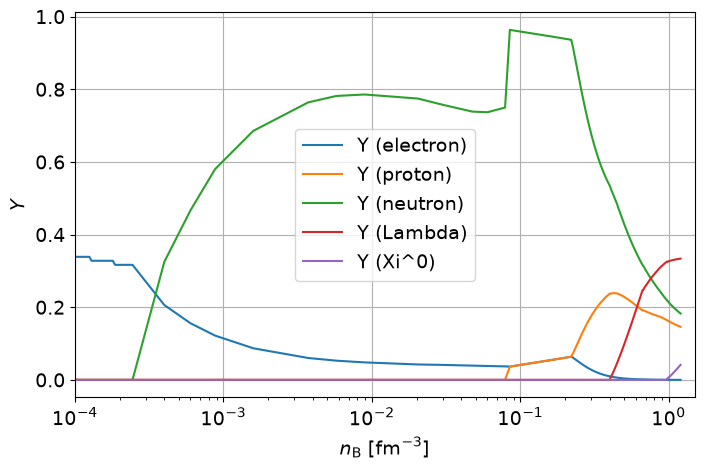
For certain applications, it is convenient to replace the masked-out values by a floating-point value. For the case of particle number fractions, an appropriate choice would be zero. To replace the masked values with another value of your choice use the .filled(<value>) syntax as illustrated below when plotting the particle fractions:
[20]:
particles = [
    'Y (electron)',
    'Y (proton)',
    'Y (neutron)',
    'Y (Lambda)',
    'Y (Xi^0)'
]

nB = eos.params.nb.grid_points

plt.figure(figsize=(8, 5))
for particle in particles:
    # Replace any masked-out values with zero via the .filled method
    plt.semilogx(nB, eos.compo[particle].filled(0.0), label=particle)

plt.legend()

plt.xlabel(r'$n_{\mathrm{B}}$ [fm$^{-3}$]')
plt.ylabel(r'$Y$')

plt.xlim(1.e-4, 1.5)

plt.grid()
plt.show()